See every room. Free. Forever.
Most free tools only see their own brand of hardware. Photon brings live health for Teams, Webex and Zoom together with imported Google Meet hardware inventory — no agents, no hardware, no lock-in, no cost.
What Photon does, it does for free.
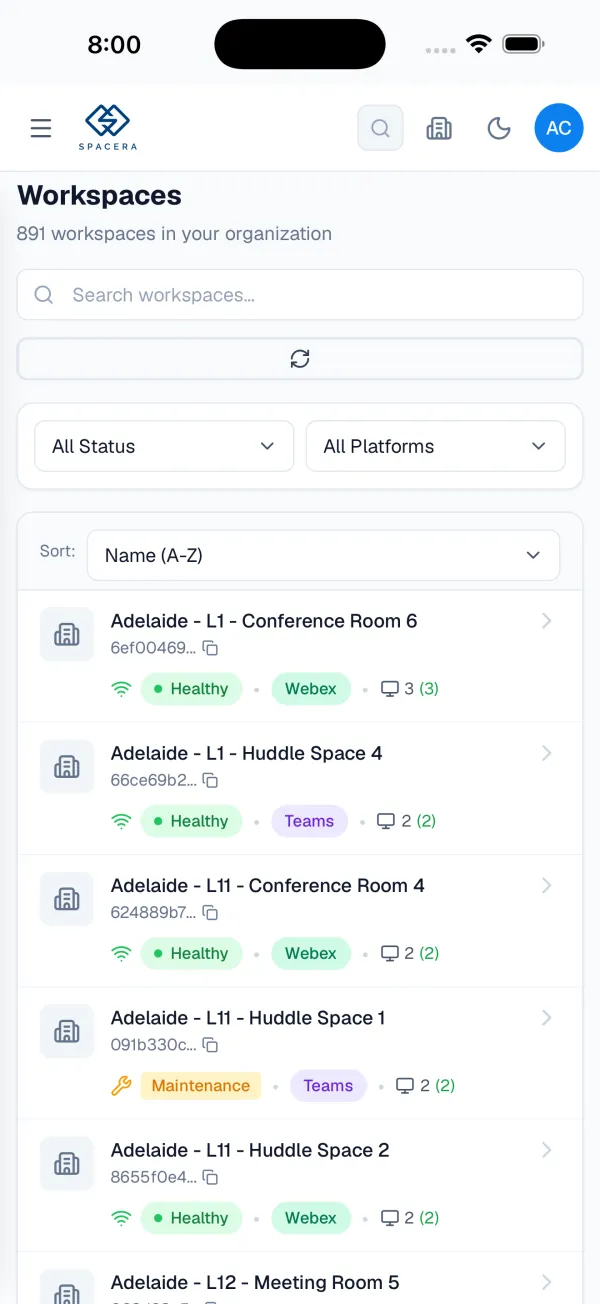
Every room on one screen, for as many rooms and people as you have.
Unified global dashboard
Microsoft Teams, Cisco Webex and Zoom health, plus imported Google Meet hardware inventory, on one screen. Google Meet uses Workspace registration and CSV import.
Real-time fleet health
Online, offline, degraded — see the status of every device the moment it changes, on the dashboard or in the Spacera app.
Zero deployment
No agents to install. No hardware changes. No professional services engagement. Photon connects via secure cloud-to-cloud OAuth. You're live in minutes.
SSO & enterprise-ready
Single sign-on from day one and role-based access. Read-only access to your platforms. Device health is encrypted in Microsoft Azure. Apollo uses Microsoft Azure. EU, UAE and US telemetry regions are planned, not generally available; confirm the available region and your residency requirements with us before onboarding.
Unlimited rooms. Unlimited users.
No per-room fee. No seat limits. Not a trial. Photon is free forever — for every room you have, for every person who needs to see them.
The Spacera app
Room health on iPhone, iPad and Android, free to download. Push alerts come with Mission Control and HyperCare.
You’ve been paying a Visibility Tax.
For years, seeing every room in one place meant paying for it: a premium tier from each hardware vendor, or a separate monitoring product. Knowing a camera is offline shouldn’t cost extra.
Basic visibility is not a premium feature. It’s a baseline right.
Live in under five minutes.
Connect your platforms
A Teams, Zoom or Webex admin approves read-only access. No passwords, no agents. Works with Teams, Webex and Zoom out of the box.
See your entire fleet
Your full room inventory appears automatically — every device, every status, every site. Global visibility in under five minutes.
Spot problems as they happen
Photon marks degraded and offline devices in real time, on the dashboard and in the Spacera app — so whoever is watching sees the broken camera without waiting for a help desk call.
Works across 11+ room platforms.
- Microsoft Teams
- Cisco Webex
- Zoom
- Google Meet
- Neat
- HP Poly
- Logitech
- Yealink
- Jabra
- Crestron
- QSC Q-SYS
Running Teams Rooms? Photon works read-only with Microsoft’s Teams Rooms Pro Management portal, with access your admin approves. See Microsoft Teams Rooms monitoring with Spacera.
Photon sees the dead room. It doesn’t save the 9:00 meeting.
It’s 8:55. The boardroom camera went offline overnight, and Photon has the camera marked offline on the dashboard and in the Spacera app — for anyone who happens to be looking. On its own, Photon doesn’t test the room before people arrive, doesn’t send an alert and doesn’t fix anything. So if you stop at Photon, someone can still walk into a dead room at 8:55, and someone still has to go and fix it.
Nobody tests the room before the meeting.
Launch Checks every morning
Launch Checks are scheduled before 6 AM local time, and nine in ten are done by 9 AM. Each room and its peripherals are checked, then put through a real test: Zoom and Webex rooms join a short test meeting; Teams Rooms take a test call.
You only see it if someone is looking at the dashboard or the app.
Alerts where your team works
Alerts to 13 channels, including push to the Spacera app, Microsoft Teams, Slack, SMS, email and PagerDuty.
Someone has to go and fix it.
Emily — automated L1/L2 fixes
Emily restarts devices, resets configuration and refreshes sign-ins remotely, and logs every action. Nine in ten of the faults Apollo raises are resolved without a human touching them. (Random sample of Apollo-raised service requests, August 2026.)
Someone has to raise the ticket and work out what broke.
Tickets with the diagnosis attached
Ticket integrations cover ServiceNow, Jira Service Management, Freshservice, BoldDesk and ConnectWise, with Zoho Desk setup available through your Spacera partner. Your partner will confirm the workflow included in your service.
Mission Control goes looking for the dead room.
Photon waits for someone to look. Mission Control runs a Launch Check on your rooms every morning, alerts your team, fixes what it can and tickets the rest with the diagnosis attached. Same platform, nothing to reinstall.
Mission Control
US$35
That’s US$420 per room per year for Launch Checks, Emily, alerts and tickets.
A partner can switch on a 30-day Mission Control trial from their partner portal; when it ends, your rooms fall back to Photon. Moving up from Photon keeps your rooms, history and settings — nothing is reinstalled.
Start free, upgrade any timeRather hand the fix to someone else? HyperCare Managed adds a 24×7 L1–L3 service desk for US$80/room/mo. We take the 3 AM call.
Stop flying blind. It’s free.
Connect your environment in minutes. No credit card. Not a trial. No sales call required.