Skip to content

All integrationsZoom Rooms

Find the Zoom Room that won’t start the 9:00.

A test call every morning, not a complaint at 9:05. Apollo dials each Zoom Room into a short meeting before the working day and checks it can be seen and heard. Emily fixes what she can remotely, and the rest reaches a person as a ticket with the diagnosis attached.

Start for free

Free forever on Photon. Launch Checks and Emily come with Mission Control at US$35/room/mo.

Running Teams Rooms or Webex devices too? Same dashboard, same morning check.

a Launch Check and test call for each room you enrolScheduled before 6 AM local time
Every morning
typical room availability in business hoursMedian Zoom and Cisco room under Apollo management, business hours, Jul–Sep 2026.
99.9%
agents deployedCloud-to-cloud, through Zoom’s API
0

The failure it prevents

A Zoom Room looks fine until someone needs it.

Zoom Rooms rarely fail loudly. A room drops offline overnight, an update waits to install, a microphone goes quiet. Nobody finds out until the 9:00 can’t start, and the service desk gets a ticket that says the room is broken.

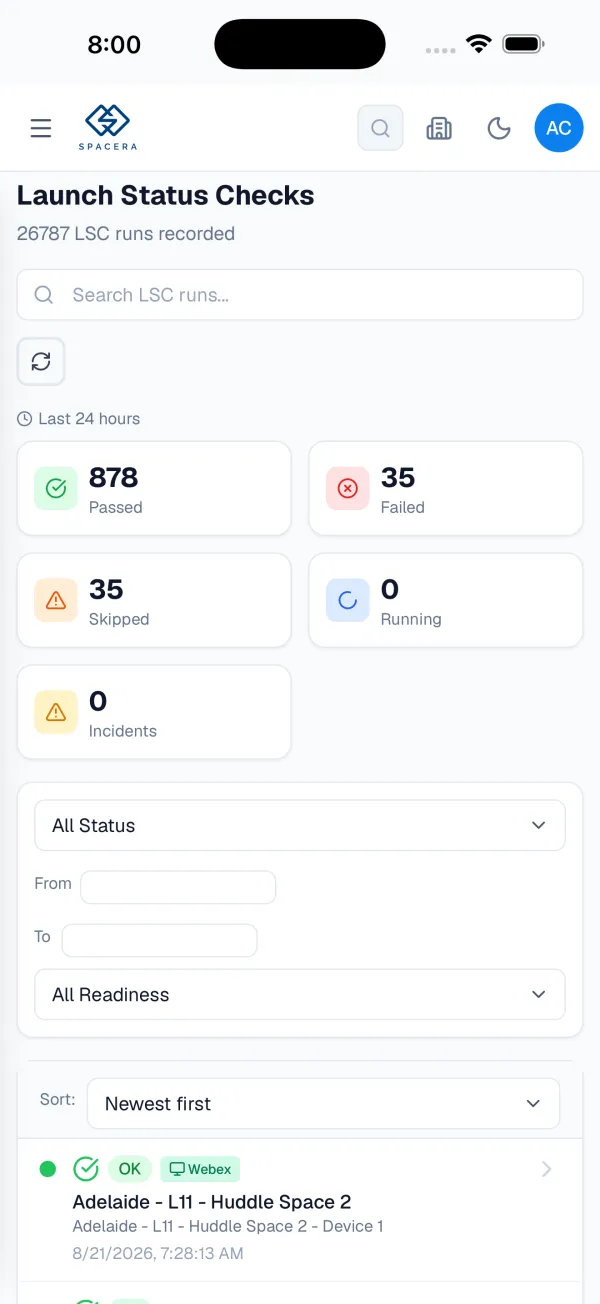
Spacera app Launch Checks: this morning's passed, failed and skipped rooms

Without a morning check

  1. 8:55People arrive for the 9:00. The controller says the room is offline, or the far end can’t hear anyone.
  2. 9:00The meeting starts late, from someone’s laptop. Someone rings the service desk.
  3. LaterThe ticket says “Zoom Room broken”. An engineer walks over to find out why.

With Apollo

  1. Early morningApollo checks the room is free, starts a short Zoom meeting and dials the room in. The Launch Check is scheduled before 6 AM local time.
  2. Fault foundZoom’s own call-quality data for that call passes or fails video, audio and the network. Emily runs the fixes she can remotely and logs each one.
  3. Needs a personA ticket lands in your ITSM tool with the room, device and test results attached, and an alert reaches the Spacera app or Zoom Team Chat.

Launch Checks are scheduled before 6 AM local time, and nine in ten are done by 9 AM. Not sure how many of your rooms fail this way? Score them with the Meeting Room Reliability Audit.

Zoom-specific faults

Zoom Rooms faults Apollo catches, and what happens next.

Each one below is something Zoom tells Apollo, or something the morning test call proves. Here’s the fault, and what happens when Apollo finds it.

Offline, or not ready for a meeting

Zoom reports every room as available, in a meeting, offline or under construction. A room that dropped offline overnight, or never came back after a power cut, is still sitting there at 9:00.

What happens. Live health shows it as soon as Zoom does. Tickets raised outside business hours are held, timezone-aware, and auto-released if the room recovers on its own.

Zoom says the room has a problem

Zoom keeps its own health verdict for every room, with the list of issues behind it. It’s useful, and easy to miss in a portal nobody has open at 7 AM.

What happens. Apollo shows Zoom’s issue list with the room and flags it in the morning check, beside every other room you run.

It joins, but nobody can see or hear

The room joins the call, but the camera image never arrives, the microphones stay silent, or the network drops packets.

What happens. The Launch Check unmutes the camera and microphone and holds the call for about a minute. Zoom’s quality data for that call then passes or fails video, audio and the network on latency, jitter and packet loss.

An update waiting, or a version behind

Zoom reports the Zoom Rooms version and firmware each room runs, and the version it’s waiting to install. Touch controllers report their own.

What happens. Apollo shows both for every room, so a room still waiting on an update stands out before it spoils a meeting.

Housekeeping switched off

Zoom Rooms has settings for a weekly system restart and a daily audio device test. Both quietly keep rooms healthy, and both get switched off.

What happens. Every Launch Check warns when a room’s weekly restart or daily audio test isn’t set, so you can turn them back on.

Stuck in last night’s meeting

A room that never left last night’s meeting still shows as in a meeting, and won’t take the next one.

What happens. Apollo shows the room as busy when it shouldn’t be. Administrators can take it out of the meeting from Apollo.

Device actions on Zoom Rooms include restarting the Zoom Rooms app, on any hardware that runs it.

Beyond the Zoom portal

What Apollo adds to your Zoom Rooms

Zoom tells you how a room is. Apollo proves each morning that it can take a call, then puts the result where your service desk already works.

Every morning

  • A test call every morning. A Launch Check on every room you enrol, with a real Zoom meeting that proves the room can join, be seen and be heard.
  • Automation first, people next. Emily logs every fix she runs; what she can’t clear goes to a person with the diagnosis. HyperCare adds a 24×7 human service desk, L1–L3.

Where your team works

  • Tickets where your team works. Ticket integrations cover ServiceNow, Jira Service Management, Freshservice, BoldDesk and ConnectWise, with Zoho Desk setup available through your Spacera partner. Your partner will confirm the workflow included in your service.
  • Alerts in your channels. Push alerts in the Spacera app that open the affected room, messages in Zoom Team Chat, and 13 channels in all.

Across every room

  • Every other room. Microsoft Teams Rooms and Cisco Webex devices, plus Neat, HP Poly, Logitech, Yealink, Crestron and Q-SYS, in the same dashboard. Google Meet and Jabra hardware join as imported inventory.
  • Reliability reports. Across every room, whatever platform it runs.

What Apollo sees

What Zoom shares with Apollo, and what it doesn’t.

Knowing the limits matters as much as the list. Here’s what reaches Apollo from each Zoom Room.

From every Zoom Room

  • Room status — available, in a meeting, offline or under construction — refreshed about every 2 minutes
  • Zoom’s health verdict for the room, with the issues behind it
  • Zoom Rooms app and firmware versions, and the version waiting to install
  • The selected camera, microphone and speaker
  • IP address, MAC address and hostname
  • When the room last started, so overnight restarts show up
  • People count, temperature, humidity and air quality, from hardware that reports them

Not from Zoom

  • Every peripheral in the room: Zoom names only the selected camera, microphone and speaker
  • CPU, memory or an uptime counter
  • Devices in personal or home mode: Apollo sees rooms running in Zoom Rooms mode

Running Neat, HP Poly or Logitech hardware? Connect Neat Pulse, Poly Lens or Logitech Sync too, and Apollo adds that vendor’s own device detail.

Sensor readings depend on the room hardware, not on Zoom.

How it works

Zoom Rooms integration in minutes. No agents.

Start with free visibility, add the morning test when you want the broken room found for you, and hand the whole fleet over when you’d rather not run it yourself.

  1. Approve access

    A Zoom admin connects Apollo from Fleet, Add Platform, Zoom Rooms, and authorises it with OAuth. Rooms appear within minutes, with nothing to install in them.

  2. See every room, free

    Every Zoom Room, its status, versions and Zoom’s health verdict in one live dashboard, read-only on Photon.

  3. Test and fix every morning

    Mission Control adds Launch Checks, Emily and tickets with diagnostics, at US$35/room/mo. A partner can switch on a 30-day trial on your own rooms.

  4. Hand the rooms over

    HyperCare Managed adds a 24×7 service desk, L1–L3, with RMA and vendor management and preventative maintenance, at US$80/room/mo.

Mission Control and HyperCare Managed are bought through a certified Spacera partner, together with AV integrators, MSPs and telcos. Making the case internally? What Apollo means for IT directors.

Questions

Zoom Rooms, answered.

How does Apollo connect to Zoom Rooms?

Cloud-to-cloud, through Zoom’s API. A Zoom admin authorises Apollo with OAuth, and the rooms registered to your account appear within minutes. There are no agents, no hardware and no network changes. Detailed permission and architecture documents are shared under NDA.

What does the morning Launch Check do on a Zoom Room?

Apollo first checks the room is free: online, not in a meeting, and with nobody counted in it where the hardware reports people count. It then starts a short Zoom meeting, dials the room in, confirms it joined, unmutes its camera and microphone and holds the call for about a minute. Zoom’s call-quality data for that call decides whether video, audio and the network pass. Launch Checks are scheduled before 6 AM local time, and nine in ten are done by 9 AM.

Could a test call ring a room during a meeting?

Apollo is built not to. A busy room is left alone and the check waits for it. A scheduled check that can’t start within an hour of its slot is skipped for the day, rather than ringing a room after people have arrived.

Which Zoom Rooms faults can Apollo fix without a person?

Emily, Apollo’s automated L1/L2 technician, handles faults such as sign-in failures and configuration drift remotely, and logs every action. Nine in ten of the faults Apollo raises are resolved without a human touching them. (Random sample of Apollo-raised service requests, August 2026.) Faults she can’t clear, such as failed hardware, go to a person as a ticket with the room, device and test results attached.

Does it work with Neat, HP Poly and Logitech hardware running Zoom Rooms?

Yes. Any hardware running Zoom Rooms appears through Zoom. Connect the hardware’s own cloud as well (Neat Pulse, Poly Lens or Logitech Sync) and Apollo adds that vendor’s device detail. Devices in personal or home mode don’t appear; Apollo sees rooms in Zoom Rooms mode.

Does Apollo record our meetings?

No. Apollo stores device telemetry — health, status and configuration — encrypted at rest in Microsoft Azure. Apollo uses Microsoft Azure. EU, UAE and US telemetry regions are planned, not generally available; confirm the available region and your residency requirements with us before onboarding. It does not record or read your meetings. OAuth tokens are encrypted and you can revoke them from your admin portal at any time.

What does Zoom Rooms monitoring cost?

Photon is free forever: live health for every Zoom Room, with read-only access. Launch Checks, Emily and tickets come with Mission Control at US$35/room/mo. HyperCare Managed adds a 24×7 L1–L3 service desk at US$80/room/mo. Mission Control and HyperCare are bought through a certified Spacera partner.

Zoom ISV Partner.

Apollo's Zoom Rooms integration is validated and certified under Zoom's ISV partner program. Apollo connects through the Zoom API with secure OAuth — no agents, authorised in minutes — and is built against Zoom's enterprise API standards.